![Apollo_Logo_img only.png]](https://help.apollo.ai/hs-fs/hubfs/Apollo_Logo_img%20only.png?height=40&name=Apollo_Logo_img%20only.png)
Open a meeting, then click on the three dots in the top-right corner. Select "Download documents", then pick your preferred file format:
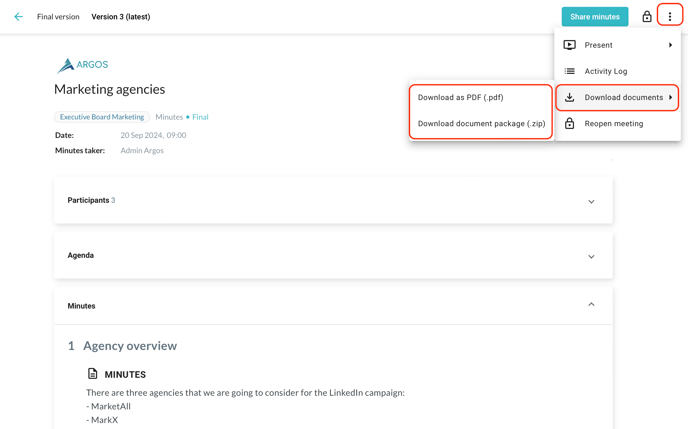
If you select "Download as PDF", only the participants list, agenda, minutes, attachments list, and signature are downloaded. If you select "Download document package" instead, the attachments themselves are also downloaded.
To download a circular resolution instead, open the selected resolution, then click on the download button in the top-right corner and pick your preferred file format:
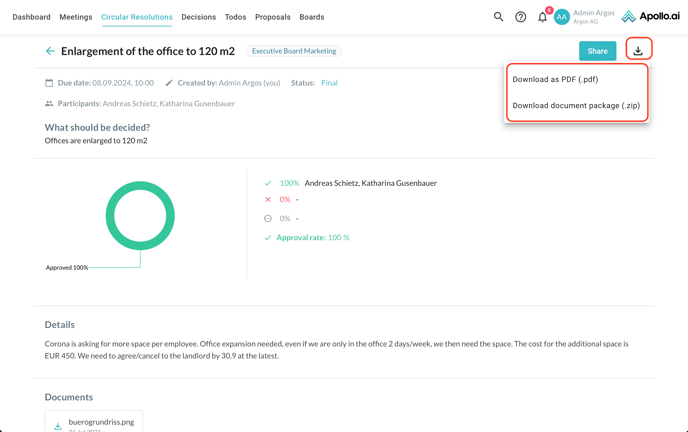
If you select "Download as PDF", only the description, details, result, comments, and attachments list are downloaded. If you select "Download document package" instead, the attachments themselves are also downloaded.